
At the University of Rhode Island, assistive technology (AT) is an important part of how students with disabilities access academic content and participate fully in the learning environment. AT tools help students with reading, writing, note-taking, organization, communication, and managing course materials. DAI works with students to identify, approve, and implement the technology that best supports each student’s documented needs. Approved AT is connected to a student’s accommodation plan, and its use is supported through training and ongoing support from the DAI team.
Core Assistive Tools Available
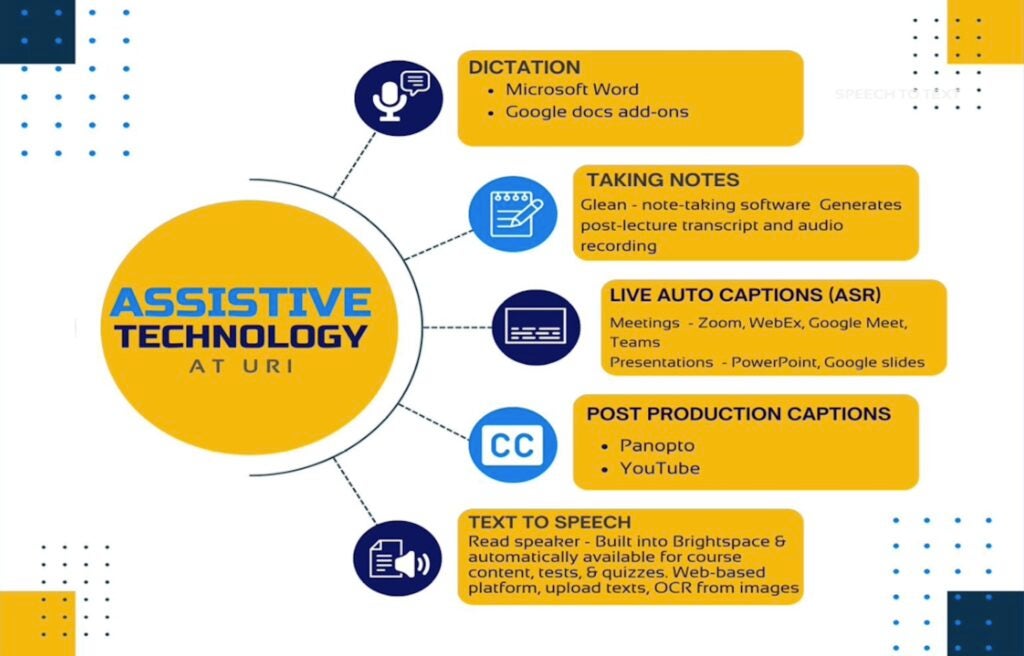
Dictation & Speech-to-Text
All URI students have access to products that support speech-to-text that help with writing and productivity, including
- Microsoft Word dictation, built into the Office 365 suite provided to all students
- Google Docs Voice Typing, available through add-ons in the Google Workspace platform
These tools allow spoken words to be converted directly into typed text, which can help students who have difficulties with writing or fine motor tasks.
Note-Taking Support
For students who need support capturing lecture content, DAI provides access to Genio (formerly Glean). The platform records lectures and creates searchable transcripts, lets students take notes while listening, and allows students to upload slides (when provided) and link recordings to specific content segments. Genio helps students adjust to college-style lecture formats where material is presented at a faster pace and with less built-in summary than many high school classes.
Text-to-Speech & Reading Supports
URI provides multiple ways for students to have text read aloud, which can be especially helpful for reading dense material or navigating unfamiliar learning platforms, especially for those with processing, visual, or reading-related needs.
- ReadSpeaker in Brightspace, which allows course content in Brightspace to be read aloud
- ReadSpeaker Web Upload allows students to upload their own files, including textbooks and PDFs, to access read-aloud functionality
These tools are available campus-wide and benefit many students, whether or not they are officially registered with DAI, as part of an accessible learning environment.
Live Auto-Captions & Video Captioning
- Live auto-captions are available for one-on-one meetings and many meetings across campus to support students with hearing or processing needs.
- For course recordings, many faculty use Panopto, which can generate captions for pre-recorded lectures and multimedia content. These captioning features help ensure that video and audio course materials are more accessible to students with diverse learning needs.
How Assistive Technology Fits Into Accommodations
Assistive technology accommodations are part of the interactive accommodation process at URI. To access AT through DAI, students must engage in DAI’s three-step interactive process.
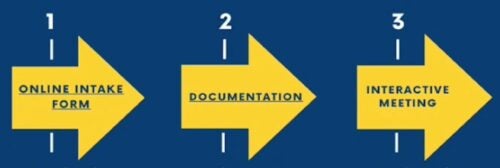
Unlike universal campus tools that are available to all students, AT provided through DAI is specifically tied to a student’s accommodation plan and documentation of a disability.
Disability Resource Mentors (DRMs) & Assistive Tech Support
Disability Resource Mentors (DRMs) help DAI students navigate the practical side of assistive technology and campus resources. DRMs also host drop-in support sessions where students can get assistance with tools like Genio, ReadSpeaker, or other tech platforms.

Students Lead Their Own Access
As with all accommodations at URI, students are expected to take the lead in requesting, using, and communicating about assistive technology. This means that students:
- Initiate technology accommodations through DAI
- Communicate directly with instructors when using AT
- Advocate for their access needs in academic settings
Assistive technology is a powerful support, but it must be integrated proactively by each student as they plan their semester and coursework.