
Dual Enrollment closed for 2026-2027
As of July 22, 2026, applications into the Dual Enrollment program at the University of Rhode Island are closed for the 2026–2027 academic year due to limited availability.
All students who have already been approved and enrolled in Dual Enrollment will continue to receive full support in enrollment throughout the remainder of the academic year.
Public high school students still seeking URI courses and academic credit for the 2026-2027 academic year should contact their high school guidance counselor to discuss concurrent enrollment courses that may be available.
Dual Enrollment
If this is your first time registering for a course at the University of Rhode Island, welcome!
These are three steps to register for URI dual enrollment as a high school student. Even if you have taken a course at URI before, you must follow these steps each semester to enroll as a non-degree student.
Step 1: Submit Application
Complete the Non-Degree Application Form. Even if you have completed a URI non-degree application form for a previous academic term, your existing URI e-Campus account will not be activated for registration until you submit a new application each semester.
Non-Degree ApplicationTrouble Accessing the Website?
If you see an error message that states, “You are not authorized for this page”, please try accessing the non-degree application form again by doing one or both of the following:
- Try to access the form from a new device or browser that you have never used to log into URI e-Campus, or using your browser “in-private” mode.
- Open a browser that you have previously used to access e-Campus, please clear your browser history, close the browser, and then open it again to access the form.
How to Complete the Application
If you continue to have trouble accessing the form, please email osi@etal.uri.edu for help.
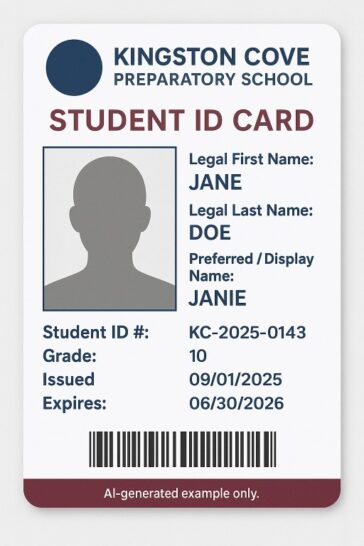
USE YOUR FULL LEGAL NAME
Your non-degree application should use your legal name exactly as it appears on your high school ID.
IMPORTANT: Select “No” that you have a four-year college degree, and “Yes” that you are currently attending a participating high school.
The term is referring to the semester that you plan to enroll. A RI resident is defined as a student who lives and attends a high school in the state of Rhode Island. The School Code is specific to your high school; use the magnifying glass to select your school.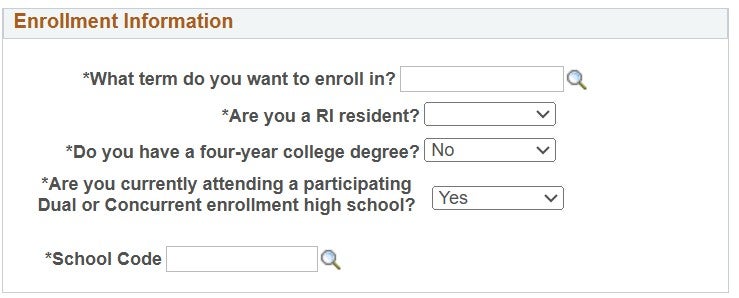 Notice: After submitting your application, there will be a 1-3 business day wait to receive your URI account and approval to register for courses. Our team will be working diligently to get this completed as soon as we can!
Please do not submit multiple non-degree applications for the same term, as this will cause further delays in approving your application. Please contact osi@etal.uri.edu if you need to confirm your application status.
STOP: Please allow up to 3 business days to receive a confirmation email before continuing to Step 2.
Step 2: Create Your Account
Within 3 business days after submitting your application form, you will receive your URI Student ID number in an email from es-registration-group@uri.edu (no-reply). Be sure to check your spam folder if you do not see it.
If you are a returning student, you can skip to Step 3.
If this is your first time applying to URI, use your URI ID number to create an account. Visit Getting Started – Students and click on the “Register for an eCampus Account” link. You will create a username and password, provide a back-up personal email, and create security questions.
This step will create a one-time temporary password that will be later changed. Remember to keep these for future use!
STOP: Please allow up to 24 hours before continuing to Step 3.
Step 3: Sign-On
A cell phone will be required for this step.
After you create your account (Step 2), your uri.edu email account and username will become available through SSO within a few hours. You will use your previously created one-time temporary password to login. After logging, you will then update to a permanent password.
What is Single Sign-On (SSO)?
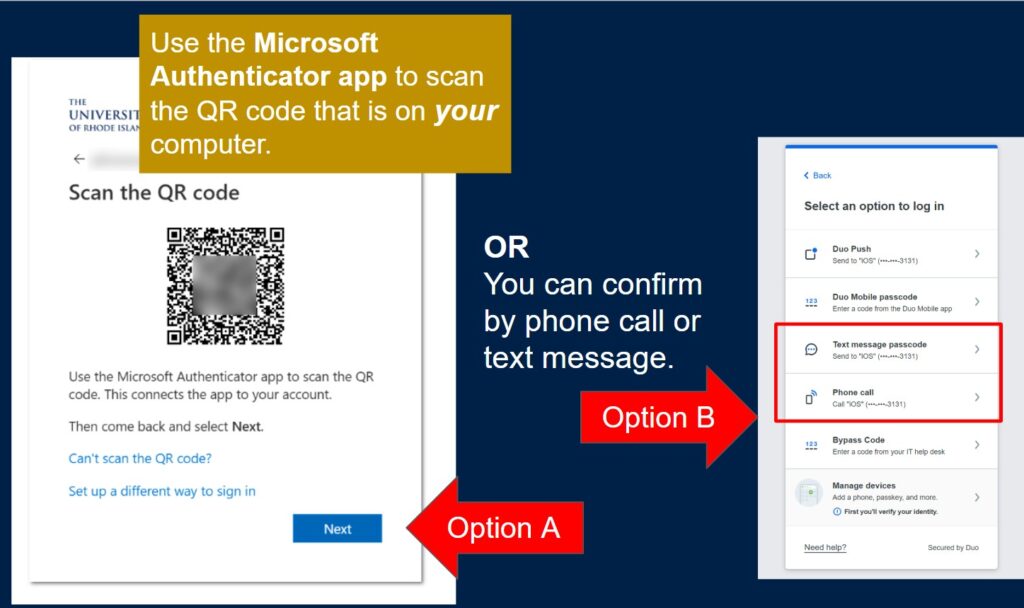
The University of Rhode Island requires SSO and multi-factor authentication be enabled on your URI issued accounts (@uri.edu). Microsoft Authenticator is the default method; however students may also use a text message or phone call for verification.
Here are resources below on creating an SSO account:
Once your password has been reset, you will proceed to the Microsoft Authenticator App. You can also use a phone call or text message for Single-Sign-On. If you have trouble logging in, contact please contact the URI IT Service Desk at 401-874-4357 or helpdesk@uri.edu.
There may be a 15-minute delay after creating your SSO account.
Step 4: Register for Courses
You should plan to work closely with your school guidance counselor to determine classes that will meet your general education requirements. Follow these step-by-step instructions for enrolling in URI courses via e-Campus:
Course RegistrationYou will be required to have your school’s guidance counselor submit a letter of support with the following information:
- Students name, URI ID number, and grade-level
- Planned course names and numbers
- Letter should be on school letter head and include contact information
Have registration questions?
- Contact osi@etal.uri.edu
- Review course registration Information
- Visit the virtual IT Service Desk
Academic Year 2026-2027
| URI Term | Deadline for Guidance Counselors to submit Support Letters | Non-Degree Application Closes | Course Registration Closes |
| Fall 2026 | Sept. 4, 2026 | Sept. 14, 2026 | Sept. 22, 2026 |
| Spring 2027 | Jan. 15, 2027 | Jan. 29, 2027 | Feb. 2, 2027 |
Check the URI Academic Calendar for addition registration and drop deadlines.